
Know everything
happening on your site.
Stop what shouldn't be.
Obzervi is the WordPress activity log plugin that records every action as a complete audit log, uses AI to spot patterns humans miss, and blocks malicious IPs before they cause damage. One plugin. Three superpowers.
No competitor combines activity logging + AI analysis + IP security in one plugin.
Built by DigiFlow
Install, Activate, Relax
Obzervi starts working the moment you activate it. No configuration wizards, no complicated setup. It tracks everything by default you just choose what to exclude.
from WordPress
recorded instantly
surfaced automatically
banned in real-time
Telegram notifications

WordPress Leaves You Guessing
When something changes on your website, you're often left asking the same painful questions, and without a complete audit trail, finding answers can take hours.

Who changed this page?
Why did traffic suddenly drop?
Who updated that plugin?
Why was this user role modified?
When did this issue start?
Obzervi gives you the answers instantly.
A complete audit trail means no more guessing, just clear answers, the moment you need them.
Download Free
Three Tools That Usually Require Three Plugins
Activity logging, AI-powered analysis, and IP security combined into a single, lightweight WordPress activity log plugin — a complete audit log with a clean dashboard.

Complete Activity Log & Audit Trail
Tracks every user action: post edits, plugin changes, login attempts, settings modifications, media uploads, and more. Filterable by user, date, and event type.
AI-Powered Insights
One click and AI analyzes your recent activity, spotting unusual patterns, summarizing what happened, and recommending actions. Like having a security analyst on staff.
IP Security & Blocking
Tiered IP banning (2hrs → 6hrs → permanent), subnet blocking for IPv4/IPv6, whitelist/blacklist controls. Protects login, XML-RPC, and REST API endpoints.
Content History & Diffs
See exactly what changed in any post or page, side by side. Track who modified content, when, and what was added or removed, down to the character.
Smart Notifications
Email alerts for critical events, plus Slack and Telegram mirroring. Get notified of failed logins, unauthorized changes, or attack spikes from any device.
Export & Reporting
Export selected events for compliance, audits, or client reports. Configurable retention periods keep your database lean without losing what matters.
Security That Learns From Your Logs
Unlike standalone security plugins that work in isolation, Obzervi's IP blocking is informed by your activity data. Repeated failed logins, suspicious REST API probes, and XML-RPC hammering trigger automatic tiered bans, no manual intervention needed.
See PricingEverything at a Glance, Nothing in the Way
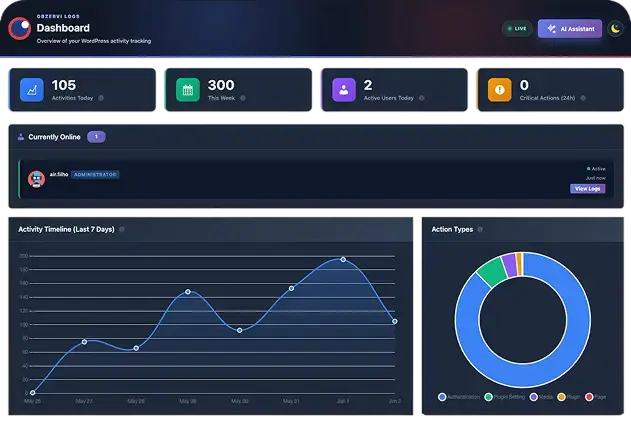
Obzervi's dashboard was designed with one principle: show what matters, hide what doesn't. Activity summaries, security stats, and AI insights, all on one clean screen.
- Bar chart activity graphs by day, week, or month
- Real-time blocked attack counter and origin map
- One-click AI analysis button, always top-right
- Tooltip icons on every card for instant context
- Simple by default, detailed when you need it
Every Action, Every User, Every Detail
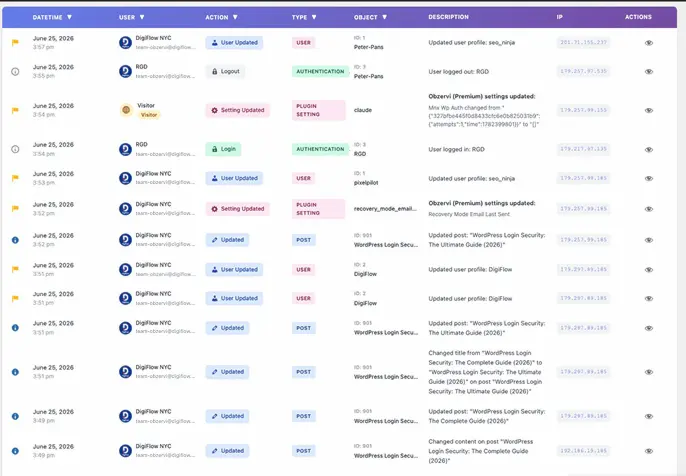
Obzervi captures every meaningful event on your WordPress site, from post edits and plugin activations to login attempts and settings changes. All in a filterable, searchable log that actually makes sense.
- User, IP address, and timestamp on every event
- Filter by event type, user role, or date range
- Tracks posts, pages, plugins, themes, users, and settings
- Color-coded severity levels for quick scanning
- 90-day retention on Free, 120+ days on Pro
See Every Change, Down to the Character
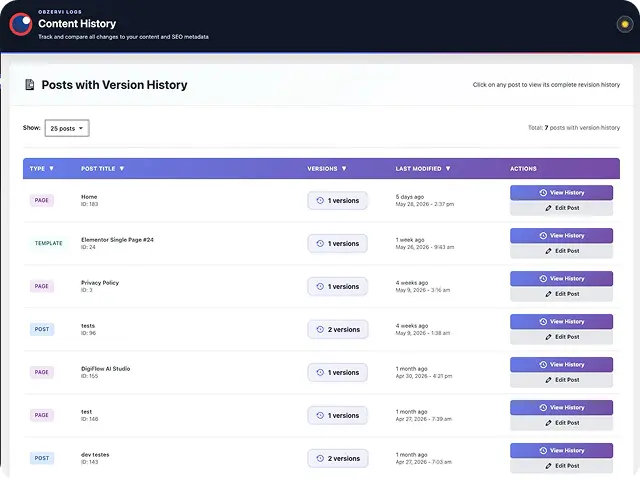
Someone edited a page and now it's broken? Obzervi shows you exactly what changed, who changed it, and when — with a clean side-by-side diff view.
- Side-by-side content comparison for any post revision
- Additions highlighted in green, removals in red
- Full audit trail: user, timestamp, and IP address
- Instantly identify unauthorized or accidental edits
- Available on Pro and Business plans
Stay in the Loop Without Logging In
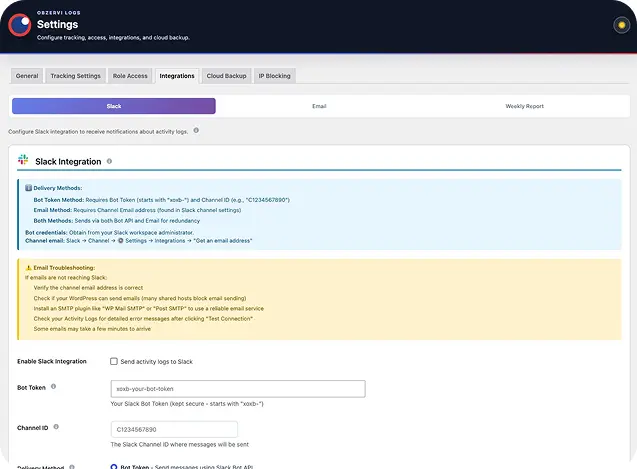
Obzervi sends real-time notifications to the channels your team already uses. Get alerted about critical events, suspicious activity, and security triggers — without ever opening the WordPress dashboard.
- Slack integration. Critical alerts in your team channels
- Email alerts for failed logins and attack spikes
- Choose which events trigger notifications
- Review and act from any device, anywhere
Your Site's Activity, Accessible From Anywhere
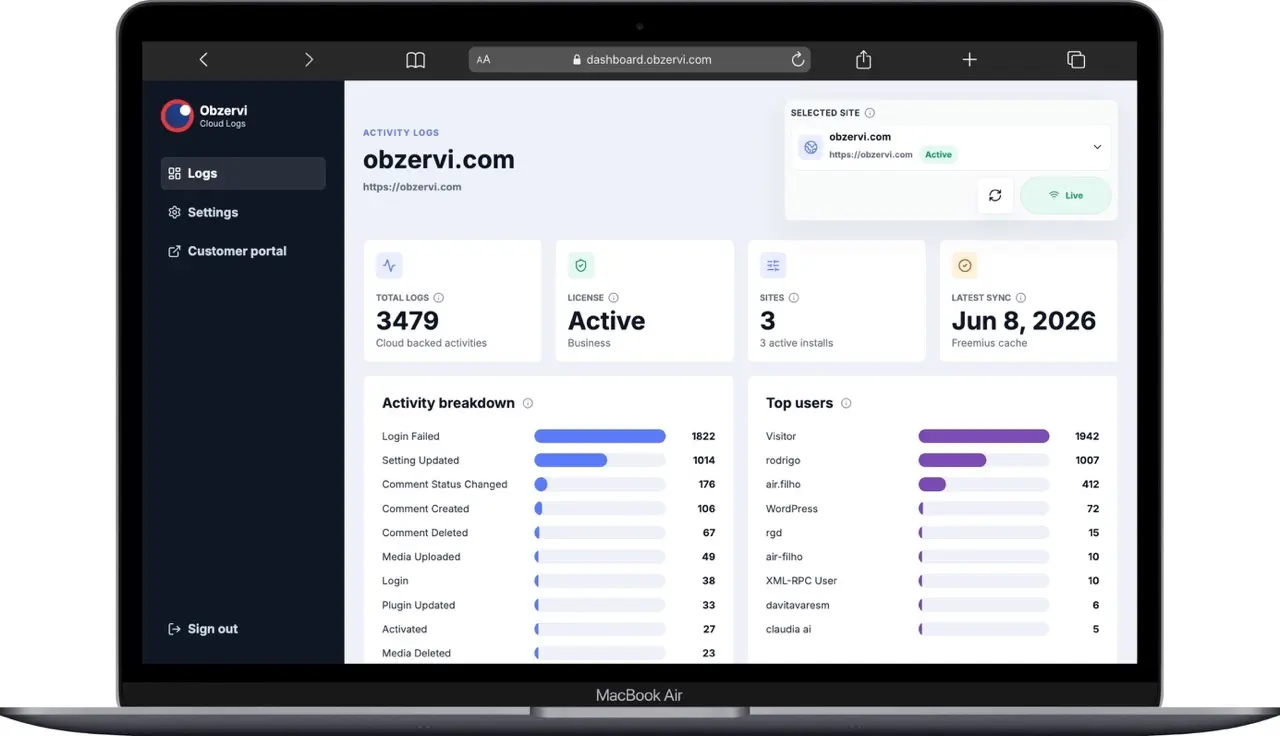
With Obzervi Premium, a secure external dashboard puts critical information at your fingertips. Monitor active licenses, review system logs, and track activity from anywhere — then export data for reporting, audits, or incident investigation.
- Real-time license visibility across every connected site
- External access to system and activity logs
- Data export for reporting and compliance
- Historical event review and incident investigation
- Centralized monitoring from any location
Built for Teams That Can't Afford to Wonder What Changed
Obzervi works for any WordPress site but it's especially valuable for four kinds of teams.
Managing client sites means proving what changed, when, and by whom without combing through revisions one post at a time.
- Show clients exactly what was modified
- Track changes across multiple sites
- Hand over clean audit exports on demand
When writers, editors, and SEOs share the same site, you need to know who edited what including Elementor sections and SEO metadata.
- Full revision history per author
- Track SEO title and meta changes
- See Elementor template edits
Stop brute-force attacks before they succeed and catch suspicious behavior the moment it happens, no separate security plugin needed.
- Auto-block failed login attempts
- Tiered IP banning (2hr → 6hr → permanent)
- Slack and email alerts for critical events
GDPR, SOC 2, and HIPAA reviewers want clean, exportable audit trails. Obzervi produces them by default, no scrambling at audit time.
- Exportable logs with full user & device data
- Severity-tagged event classification
- Long-term retention with cloud backup
Inside Obzervi: Every Feature, Every Menu
A full tour of what Obzervi does, menu by menu, feature by feature. Click any tab below to dive into a specific area of the plugin.
See Everything That Happens on Your Site at a Glance
The Obzervi Dashboard gives administrators and site owners a complete real-time overview of user activity across their WordPress environment. From routine actions to critical security events, everything is organized into a single, easy-to-understand interface.
Instant Activity Overview
Immediate visibility into what's happening on your site with key metrics:
- Activities performed today
- Total activity logs recorded
- Activity volume this week
- Unique active users in the last two hours
- Critical actions requiring attention
- Current online users
Identify Important Events Faster
Obzervi automatically highlights critical actions:
- User role changes
- Plugin installations and updates
- Content deletions
- Permission changes
- Other high-severity administrative actions
Track Activity Trends Over Time
A built-in activity timeline gives a clear historical view of user actions. Activity is automatically categorized by type:
- Authentication events
- Plugin activity
- Plugin settings changes
- Media actions
- Page updates
- Content management actions
Know Who Is Most Active
The Top Active Users report quickly identifies who is generating the most activity, how frequently they're interacting with the site, and which users are driving the majority of administrative actions.
Review Critical Actions in Seconds
The Top Critical Actions panel highlights the most important events from the last 24 hours, so you can focus on what matters without reviewing thousands of records.
Investigate Every Event
The Recent Activity feed shows the latest actions across all users and content. Open any event for:
- The user responsible
- The exact action performed
- The affected content or setting
- Detailed change information
- Precise timestamps
Monitor System Health
Beyond activity tracking, Obzervi surfaces operational insights:
- Total log volume
- Active tracking coverage
- Database storage usage
- Real-time visibility into all user activity
- Immediate alerts for critical administrative actions
- Complete audit trail for accountability & compliance
- Easy investigation of changes and user actions
- User activity analytics and reporting
- Centralized monitoring from a single dashboard
Complete Visibility Into Every Action on Your Website
The All Logs section is a comprehensive audit trail of every tracked activity across your WordPress site. Whether you're investigating a specific change, monitoring user behavior, or running a security review, All Logs gives you instant access to the complete history of actions performed throughout your website.
One Centralized Activity Feed
Every recorded event in a single, searchable interface:
- User logins and authentication events
- Content creation and updates
- Page and post modifications
- Media uploads and deletions
- Plugin installations and updates
- Settings changes
- Administrative actions
- Form-related activity
Powerful Filtering & Search
Find what you need using advanced filters:
- User
- Action type
- Object type
- Trigger source
- Forms and integrations
- Date ranges
Prioritize What Matters Most
Obzervi automatically categorizes activity by severity so you can focus on the events that deserve immediate attention:
- Critical
- High
- Medium
- Low
- Informational
Detailed Audit Records
Every log entry shows the essentials at a glance:
- Date and time
- User responsible
- Action performed
- Affected object
- Event description
- IP address
- Severity level
Investigate Every Change
Need more context? Open the log details to see a complete breakdown:
- User information
- IP address
- User agent and browser details
- Timestamp & action type
- Affected object & trigger source
- Detailed change history
- Before-and-after values when available
Export Your Audit Data
Export logs whenever you need to create reports, archive records, share activity data with stakeholders, or meet compliance requirements. Hand a clean audit trail to auditors, clients, or leadership in seconds.
- Complete audit trail of all WordPress activity
- Advanced filtering for fast investigations
- Severity-based event classification
- Detailed change tracking and event history
- Full user and device information
- Exportable logs for reporting and compliance
Turn Thousands of Logs Into Clear, Visual Insight
While the Dashboard gives you a fast, real-time snapshot, Analytics is where you go deep. It transforms your raw activity history into visual reports and trends — so you can spot patterns, compare time periods, and understand exactly how your site is being used without scrolling through individual records.
Analyze Any Time Period
Switch the entire view to the window you care about with a single click:
- Last 24 hours
- Last 7 days
- Last 30 days
- Custom date range
Every chart and metric updates instantly to match the selected timeframe.
Activity Trends at a Glance
Clear bar charts show how activity rises and falls over time, making it easy to:
- Spot unusual spikes in activity
- Compare quiet and busy periods
- Identify when changes are typically made
- Track overall volume week over week
Powerful Filtering & Breakdowns
Drill into the data that matters by slicing your activity across multiple dimensions:
- By user or role
- By event type and category
- By severity, including critical actions
- By affected content or setting
Understand User Behavior
See who is driving activity across your site and how engagement is distributed:
- Most active users over the selected period
- Action counts per user
- Authentication and login patterns
- Distribution of activity by category
Surface What Needs Attention
Analytics highlights the events that matter most, so high-severity actions never get buried:
- Critical action trends over time
- Role and permission changes
- Plugin and theme activity
- Content deletions and edits
Report & Export
Take your insights beyond the dashboard for stakeholders, audits, and compliance:
- Export filtered data for the chosen period
- Share clear summaries with your team
- Build an evidence trail for GDPR, SOC 2, and HIPAA reviews
- Visual trends instead of endless rows of logs
- Flexible timeframe selection, from 24 hours to custom ranges
- Deep filtering by user, role, event type, and severity
- Fast identification of unusual or critical activity
- Clear user-behavior and engagement reporting
- Exportable insights for compliance and stakeholders
Complete Control Over What You Track, Monitor, and Protect
The Settings area is the central configuration hub for Obzervi. From activity tracking and user permissions to integrations, cloud backups, and security protection, everything can be customized to match your organization's needs.
System Overview
See important information about your Obzervi installation at a glance:
- Plugin version
- Total logs stored
- Database size
- Tracking status
- System configuration details
Flexible Activity Tracking
Choose exactly which areas of WordPress get monitored:
- Posts and content
- User authentication
- Plugins & themes
- WordPress settings
- Taxonomies
- Media library
- Navigation menus
- Administrative actions
Plugin-Specific Monitoring
Extend activity tracking into popular WordPress plugins for deeper visibility beyond core:
- Elementor
- Form builders
- Membership plugins
- eCommerce solutions
- Additional supported integrations
Role-Based Access Control
Decide who can access Obzervi and what they can see. Assign permissions by WordPress role, Administrators, Editors, or custom user roles, so sensitive activity data stays in the right hands.
Slack Integration
Real-time activity notifications directly in Slack. Configure:
- Slack channels
- Authentication tokens
- Notification methods
- Severity-based alerts
Email Notifications, Weekly Reports
Receive activity summaries and important alerts directly in your inbox. Weekly reports auto-generate and deliver activity overviews to keep stakeholders informed about site operations and security events — no manual reporting required.
Cloud Backup, Synchronization
Protect your audit history with secure cloud sync. Obzervi Cloud lets you:
- Back up activity logs
- Preserve historical audit records
- Reduce dependence on local storage
- Maintain access even if your site has issues
Built-In Brute Force Protection
Obzervi goes beyond monitoring — it actively protects your site. The IP Blocking system detects and blocks suspicious login behavior automatically:
- Failed login detection
- Automated IP blocking
- Configurable lockout thresholds
- Repeated authentication attempt monitoring
- Real-time protection rules
Advanced IP Management
Take full control over who can and cannot access your website. Manage:
- IP whitelists
- IP blocklists
- Automatically blocked IPs
- Security exceptions
- Active protection rules
- Customize exactly what activity is tracked
- Monitor third-party plugins and integrations
- Control access with role-based permissions
- Receive alerts through Slack and email
- Automate weekly activity reporting
- Secure activity history with cloud backups
- Protect websites from brute force attacks
- Manage blocked and trusted IPs from one place
Obzervi isn't just an audit log plugin — it's a monitoring, reporting, and security platform for WordPress.
Never Wonder Who Changed Your Content Again
Content History is version control for your WordPress content. See exactly what changed, who made the change, and when it happened — across posts, pages, custom post types, Elementor templates, and SEO metadata.
Complete Content Change Tracking
Obzervi automatically records changes made to:
- Posts
- Pages
- Custom post types
- Elementor templates
- SEO metadata
- Content revisions
- Titles and descriptions
- Page content updates
Full Revision Timeline
Browse content revisions and see at a glance:
- Content type
- Post or page title
- Version history
- Modification dates
- Number of revisions
- Users responsible for changes
Compare Changes Between Versions
Inspect individual revisions and compare changes side by side:
- Previous values
- Updated values
- Title changes
- Content modifications
- SEO metadata updates
- Detailed revision history
Understand Who Changed What
Every revision is tied to the user responsible — a complete audit trail for content management. Especially valuable for:
- Editorial teams
- Marketing departments
- Agencies managing client websites
- Multi-author publications
- Enterprise WordPress environments
Review Content Before & After Updates
Drill into a specific revision to see exactly what was added, removed, or modified. Troubleshooting becomes easy when:
- Content is accidentally changed
- SEO settings are updated
- Important copy is removed
- Multiple team members edit the same page
Access Content Directly
Jump from any revision record straight to the corresponding post, page, or template — so content review is a single click, not a search expedition.
- Complete revision history for posts and pages
- Track changes to content and SEO metadata
- Compare previous and current versions
- See exactly what was modified
- Identify who made each change
- Monitor Elementor templates and custom types
- Improve accountability across content teams
- Simplify troubleshooting and content audits
Manage Your Obzervi Subscription in One Place
The Account section is the centralized location for your Obzervi subscription, licensing, and account information — from license activation to beta program enrollment, all through a simple and secure interface.
Account Information
View the account details associated with your installation:
- Registered account information
- Site ID & Plugin ID
- License information
- Authentication credentials
- Connected website details
License Management
Activate, manage, and monitor your Obzervi license directly from WordPress:
- Enter and activate your license key
- Verify license status
- View subscription information
- Manage license renewals
- Access premium features
Beta Program Access
Get early access to upcoming features and product improvements. Beta participants can:
- Test new functionality before public release
- Provide feedback directly to the dev team
- Help shape future product enhancements
- Access experimental features and integrations
Secure Site Authentication
Obzervi uses secure credentials and site identification to maintain communication between your website and the platform. The Account section gives you visibility into:
- Site authentication status
- Connected services
- Account verification details
- Platform connectivity
- Manage licenses and subscriptions in one place
- Access account and site information instantly
- Activate and verify premium features
- Join the Obzervi Beta Program
- Monitor account and authentication status
- Maintain a secure connection with the platform
Your Site's Activity, Accessible From Anywhere
With Obzervi Premium, you get access to a secure external dashboard that puts critical information at your fingertips. Monitor active licenses, review system logs, and track activity from anywhere, at any time — then export data for reporting, audits, or internal reviews, and dig into historical records to investigate incidents and understand what happened when issues occur.
Real-Time License Visibility
Keep tabs on every active license without logging into each site:
- See active licenses at a glance
- Verify license status and renewals
- Monitor connected sites centrally
External Log Access
Reach your system and activity logs from outside WordPress:
- Review system and activity logs remotely
- Track events across sites in one place
- Access historical records anytime
Export & Compliance
Turn your audit trail into reports whenever you need them:
- Export data for reporting and compliance
- Pull records for audits and internal reviews
- Investigate incidents with historical event review
Secure, Centralized Access
Stay informed and in control wherever you are:
- Centralized monitoring from any location
- Visibility and control to stay prepared
- Real-time license visibility
- External access to system and activity logs
- Data export capabilities for reporting and compliance
- Historical event review and incident investigation
- Centralized monitoring from any location
Whether you're managing compliance, troubleshooting unexpected events, or simply keeping an eye on operations, the Obzervi Premium Dashboard gives you the visibility and control to stay informed and prepared.
We're Here When You Need Us
Great software should be backed by great support. Whether you have a technical question, need help with your subscription, or want guidance on configuring Obzervi, our team is ready to help.
Submit a Support Request
The Contact Us section sends a request directly to the Obzervi team. Just:
- Select the type of issue you're experiencing
- Provide a brief summary
- Describe the issue in detail
- Submit your ticket
Our team reviews your request and responds as quickly as possible.
Support Categories
Route your inquiry to the right specialist:
- Technical Support
- Billing & Licensing
- Account Assistance
- Feature Requests
- General Questions
Help Us Help You
The more detail you share, the faster we can investigate and resolve. Clear descriptions help our team understand your environment, identify root causes, and ship effective fixes.
Customer-First Support
Troubleshooting an issue, configuring a new feature, or just looking for guidance — our team is here to help you get the most out of Obzervi, every step of the way.
- Direct access to the Obzervi support team
- Fast issue reporting and ticket submission
- Dedicated technical and billing assistance
- Streamlined communication process
- Faster resolution through detailed requests
- Expert guidance from the team behind Obzervi
You're not alone. Browse guides and answers in the Obzervi Help Center, or reach out anytime — we're here.
Generic Activity Logs vs. Obzervi
Most activity log plugins just show you what happened. Obzervi tells you what it means and blocks what's dangerous — automatically.
| Other Plugins | With Obzervi | |
|---|---|---|
| Activity Logging | Basic event list with no context — you see "post edited" but not why it matters | Detailed logs with user, IP, timestamp, and content changes side by side |
| Analysis | You manually scroll through logs trying to find patterns or suspicious behavior | AI analyzes your logs and surfaces insights: unusual activity, patterns, and recommendations |
| Security | Separate security plugin needed — no connection to your activity data | Built-in IP blocking with tiered bans (2hrs → 6hrs → permanent) and subnet blocking |
| Attack Vectors | Login protection only. XML-RPC and REST API endpoints left wide open | Protects login, XML-RPC, and REST API attack vectors from a single dashboard |
| Content History | No way to compare what changed in a post or page over time | Full content diff — see exactly what was added, removed, or modified in any post revision |
| Notifications | Basic email alerts, if any. No real-time channel integration | Email alerts for critical triggers plus Slack and Telegram mirroring (Pro) |
| Cost | WP Activity Log starts at $139/yr. Sucuri security: $229–$999/yr. Two separate bills | Obzervi Pro at $69/yr — logging, AI analysis, and security in one plugin, one price |
How Obzervi Stacks Up Against the Competition
A side-by-side look at the features that matter most. Obzervi is the only plugin that combines logging, AI, and security — at a fraction of the price.
| Feature | Simple History | WP Activity Log | Sucuri | Obzervi |
|---|---|---|---|---|
| Core Logging | ||||
| Comprehensive Audit Trail | ✓ | ✓ | — | ✓ |
| Detailed Event Info & Visual Diffs | ✓ | — | — | ✓ |
| User Session Tracking | ✓ | ✓ | ✓ | ✓ |
| Dashboard Integration | ✓ | ✓ | — | ✓ |
| Search & Filter | ✓ | ✓ | — | ✓ |
| Privacy Focused (Local DB) | ✓ | — | — | ✓ |
| AI & Intelligence | ||||
| AI-Powered Log Analysis | — | — | — | ✓ |
| Pattern & Anomaly Detection | — | — | — | ✓ |
| Actionable Recommendations | — | — | — | ✓ |
| Security | ||||
| IP Blocking & Tiered Banning | — | — | ✓ | PRO |
| Subnet Blocking (IPv4 /24, IPv6 /64) | — | — | ✓ | PRO |
| Login + XML-RPC + REST API Protection | — | — | ✓ | PRO |
| File Integrity Monitoring | — | — | ✓ | — |
| Malware Scanning | — | PREMIUM | PREMIUM | — |
| Premium Features | ||||
| Content History & Diffs | — | — | — | PRO |
| Extended Retention (120+ days) | PREMIUM | — | — | PRO |
| Data Export | PREMIUM | — | — | PRO |
| IP Info with Geolocation | PREMIUM | — | — | PRO |
| Mirroring (Slack / Telegram) | — | PREMIUM | — | PRO |
| Email & SMS Alerts | ✓ | PREMIUM | ✓ | PRO |
| Pricing | ||||
| Free Tier | — | — | — | ✓ |
| Starting Price | $79/yr | $139/yr | $199/yr | $0 |
| Full-Feature Price | $79/yr | $139/yr | $199/yr | $69/yr |
Obzervi is the only plugin that offers AI analysis, IP security, and activity logging together. Competitors require multiple plugins — and multiple bills — to match what Obzervi does out of the box.
Logging + AI + Security for Less Than a Security Plugin Alone
Competitors charge $139/yr for just logging or $229/yr for just security. Obzervi gives you both — plus AI analysis — starting at $0.
Core logging
for any WordPress site
- Complete activity logging
- Dashboard with bar charts
- All Logs
- Real-Time (SSE)
- Severity Colors
- Admin Bar
- Tracking Settings
- Severity Colors
- Role Access
- Auto-Purge
$69 - Billed Annually
AI + security for serious site owners
- Everything in Free
- Advanced Analytics
- Export Logs
- Settings Import/Export
- Content History
- IP Blocking & IP Geolocation
- AI Assistant
- Active Users
$139 - Billed Annually
For agencies & multi-site managers
- Everything in Pro
- Up to 5 site licenses
- Priority support
All plans include free updates and support for the license period. Distributed via Freemius for secure licensing and one-click updates.
Common Questions
Everything you need to know about Obzervi.
Your site is already being targeted. Are you watching?
Install Obzervi in under a minute. See every action. Understand every pattern. Block every threat.
Install Free Plugin